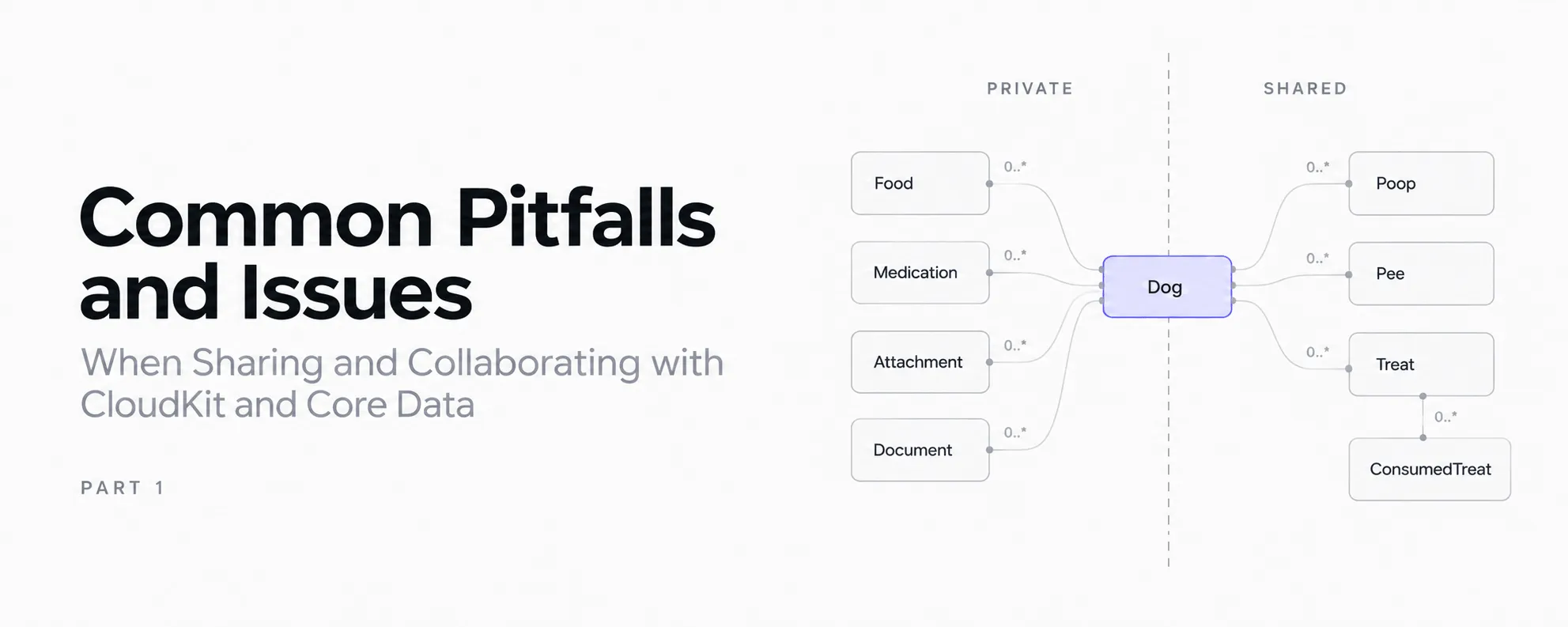
Over the last years I developed several apps where I started with a simple Core Data stack and added CloudKit out of the box, because when creating a new project, that’s just another checkbox to activate.
Throughout the conception and development process I noticed that some apps would even benefit if users could collaborate on one entity. Think of Dogtales, an app that allows to track health and daily things of your dog. Wouldn’t it be a good idea to be able to share everything related to your dog with your best half, family or even daycare? I decided to move down that rabbit hole and this time I’ll share some of my findings.
One important thing to note: I am not describing how to integrate the whole sharing lifecycle as this would require one or more dedicated posts and some abstraction as this still is dependant on your own app architecture. If that is desired, feel free to reach out.
If you have never had any touching points with CloudKit and Core Data, I’d suggest to head over to Apple’s Developer app and search for some WWDC videos. Here are some first points I’d suggest:
- WWDC21 Video: Build apps that share data through CloudKit and Core Data
- Tech Talk Video: Get the most out of CloudKit Sharing
- Sample Code: Sharing Core Data objects between iCloud users
When you have integrated the basic sharing logic, it’s time to harden the whole sharing logic. You will find out that sharing itself is not some one-off thing that is stable.
The Reason Why This Article Exists
In general, CloudKit is a great framework, and if you have the luck to stay always on the happy path, it is a blast. However, when you reach some issues, it is a black-box. I still decided to stay where I am and go through the whole process, because if I solve it once, I should be able to do it again.
If you have watched some videos and integrated your sharing logic in your codebase, you might think that it works and everything is done. Let me tell you, sharing is easy to integrate, but making it work flawlessly is the hard part. It’s important to understand that sharing is a lifecycle with several things to take care of, or you may risk data loss. Yep, you read that right, DATA LOSS. I experienced it on my own, so please take that into account and don’t make the same mistake I did. Now, let’s jump directly into it.
Pitfalls and Issues
I am assuming you know basic terminology in that regard and won’t explain common terms here. I am describing it based on my own app, so it is a bit easier to follow.
Stop-sharing can destroy the entire graph (data loss)
Assume that a user has shared their dog with a friend. That means that their dog entity is moved from the private container into the shared container automatically. At one point the user decides they do not want to share their dog anymore and keep it to their own. Thus, they stop sharing. You might think, that the framework will then move your dog from the shared container back into the private container. However, that is not true. If you don’t handle that before deletion happens, you lose all data that belongs to that specific dog.
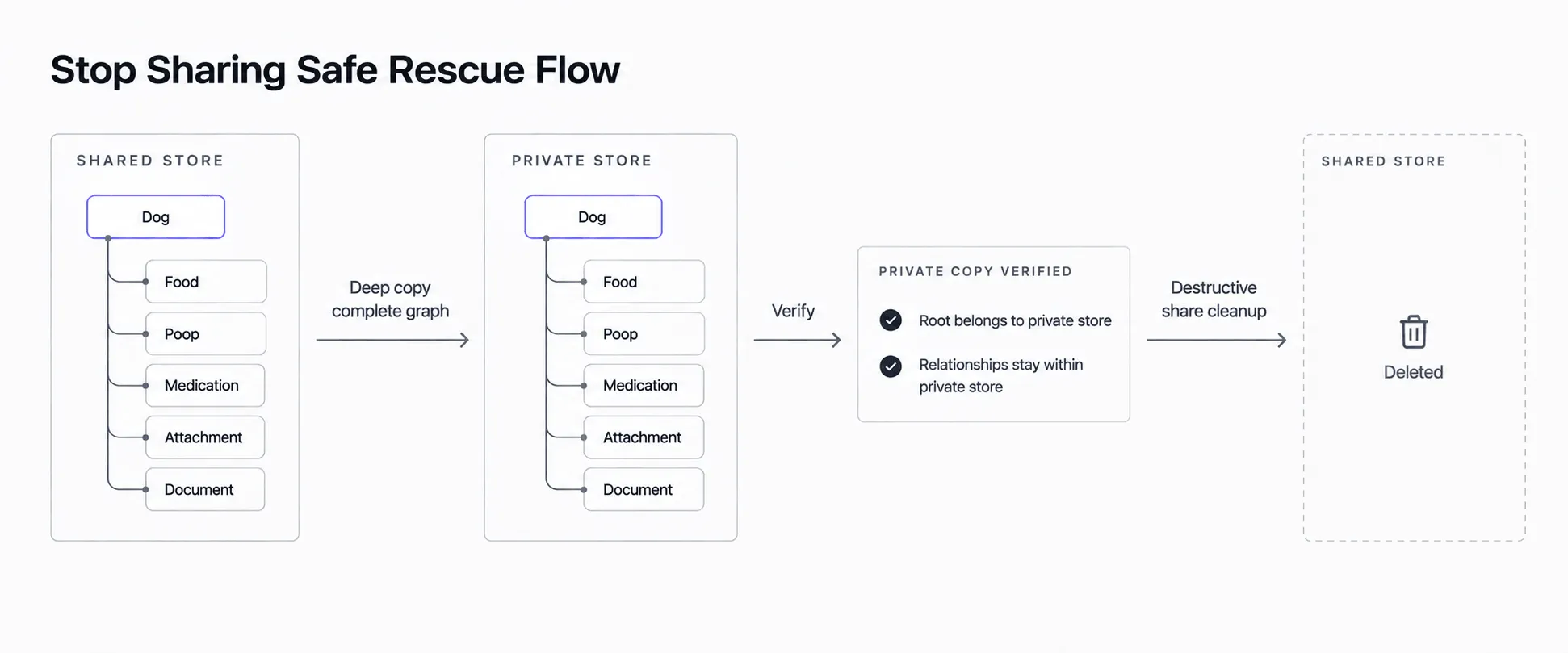 Flow of a secure unshare event to make sure no accidental data loss happens.
In that regard, you are required to make a deep-copy (rescue) of the complete dog graph back into the private store before deletion is triggered.
Rescue must be complete and transactional
If you copy back to the private store, make sure that you copy every food, poop, pee, medication, attachment, document and most importantly the relationships. Make sure to perform the save atomically and afterwards verify that the root belongs to the private store. You don’t want something half-finished in your local storage, as it will lead to corrupted data.
Never create cross-store relationships
If you rescue a private object, make sure that it does not reference an object in the shared store. Shared/global dependencies must be solved or copied into the private store too. I had that issue as I’m storing two treats entities: Treat and ConsumedTreat, where Treat is the main entity and ConsumedTreat references the treat itself, so I don’t have duplication in the local storage. When rescuing, ConsumedTreat was copied into the private store, but the Treat it referenced to was still part of the shared store. This is invalid and can result in save failures, crashes or data corruption. To solve it, make sure to search for a Treat in the private container, or copy it over if it is not already there.
Rescue must be durably idempotent
During the lifecycle it can happen that CloudKit and sharing-controller callbacks are triggered several times. Make sure to persist a marker (logical object identity or share identity) in your local storage. Don’t rely on an in-memory flag or UserDefaults. If you don’t persist such marker, you will end up with duplicated data. Imagine your wife logged 50g of kibble and the CloudKit callback happens 2 times, then you will end up with 100g of kibble.
Deletion, Un-sharing and leaving are different operations
If the owner deletes the dog, they expect that all data is destroyed. If the owner decides to unshare, they want to keep their data, so rescue should be made. If I stop sharing my dog with Jen, or she leaves the shared dog, then only the local data on Jen’s device should be deleted. It should never cause any deletion on my end. You would think here too that this should be prevented by the framework, but that is not the case. So make sure to properly guard against it.
What’s Next
These are just the first issues I encountered when hardening sharing in Dogtales. As you can see, most of them have one thing in common: Sharing is not just about the CKShare and other entities that are created for you on behalf of Core Data. You really need to understand that it is a lifecycle and think about what happens when that share eventually disappears.
We now have looked just at one side of this lifecycle. In Part 2, I’ll elaborate on what happens before and during the sharing process. It can happen that a locally stored object is just not yet ready to be shared or why accepting an invitation does not mean that the shared graph is already available. In addition, CloudKit callbacks do not quite mean what you initially might expect them to mean.
If you have run into any other CloudKit and Core Data sharing edge cases, feel free to reach out, I am always interested to hear what others have experienced.